A better way to scan.
Open a camera-first scanner with torch controls and helpful permission recovery. Scanned results are presented for review instead of triggering external actions automatically.
Meet QR & Barcode: Scanner & Generator, a thoughtfully designed Android utility for reading, creating, saving and sharing codes. From a link in a poster to a Wi-Fi code for your guests, everything you need feels close at hand.
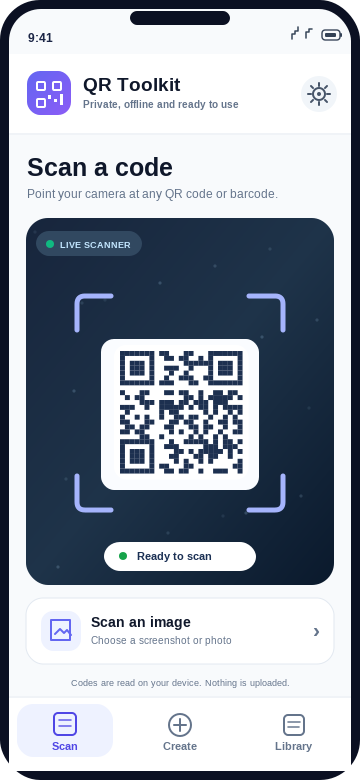
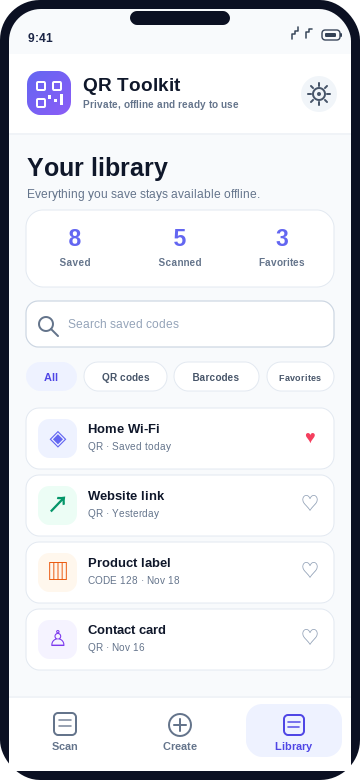
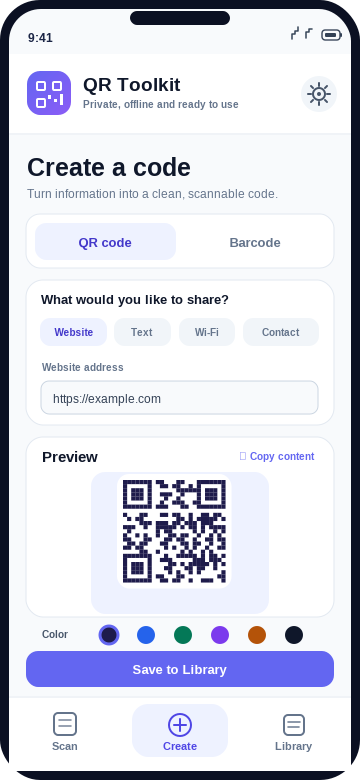
The real Android app separates scanning, creating and managing codes into clear, focused tabs. These previews reconstruct its current Compose layouts using example content.
Camera viewfinder, gallery import and clear feedback when a code is detected.
Choose a QR or barcode format, enter your content, preview, then save or export.
Find saved codes quickly with search, filters, sorting and favorites.
Illustrative interface reconstructions drawn from the QR Toolkit source code, not captured device screenshots. Sample library entries are fictional.
No maze of menus. Just clear actions designed around what you came to do.
Open a camera-first scanner with torch controls and helpful permission recovery. Scanned results are presented for review instead of triggering external actions automatically.
Scan a QR code or barcode already saved in your gallery or a screenshot, without switching to live camera.
Review links and recognized content, use contextual actions for supported formats, and keep Wi-Fi passwords masked unless you choose to reveal them.
Turn websites, plain text, Wi-Fi details, email, phone, SMS and vCard contacts into scannable QR codes with purpose-built inputs.
Generate Code 128, Code 39, EAN-13, UPC-A, ITF, PDF417 and Data Matrix codes, including relevant format validation.
Search and sort your on-device Room library, browse QR or barcode entries, favorite important codes, rename records and delete them when finished.
Choose a purpose-built QR template or a barcode type, then review the code as your content changes. Wi-Fi templates support WPA, WEP and open networks; retail formats use validation where relevant.
Website · Text · Wi-Fi · Email · Phone · SMS · Contact (vCard)
Code 128 · Code 39 · EAN-13 · UPC-A · ITF · PDF417 · Data Matrix
See the result before saving it, copying, exporting or sharing.
Six contrast-safe code palettes, a responsive preview and four distinct actions for the next step.
Palette presentation is illustrative; the app currently provides six selectable color palettes.
The indexed Room database stores your saved codes on-device. Search across entries, sort your collection, filter by type or favorites, rename items, and decide what to remove — with no silent library item cap.
The current Android source requests no Internet permission and includes no ad or analytics SDK. Camera access is requested when you choose live scanning. Scanned links are never opened automatically, and export or sharing is your choice.
Wi-Fi passwords start masked in results. Saved data is local but not encrypted by default, so treat sensitive codes accordingly.
Yes. Core scanning, generation and library features work without an internet connection. The current Android manifest does not request Internet permission.
Yes. You can use the live camera or choose an image containing a QR code or barcode from your device.
Yes. The seven QR templates include Wi-Fi and vCard contacts, plus websites, text, email, phone and SMS.
Yes. The creator provides independent Save to Library, Copy, PNG Export and Share actions.
Not by default. The app uses a local Room database; Wi-Fi password masking in the interface is not the same as encryption.
Not yet. This is a development preview based on the source repository. We will add a verified store link when published.
This is a development preview. Device acceptance and the public Google Play listing are still pending; the features above are drawn from the current Android app source.